- I really liked the higher-order thinking involved with this. Students had to think about not only the meaning but also to which category it best fit. This was for Latin 1, so the categories were rather basic.
- I turned this into a Google Slides manipulative using already-known vocabulary solely because it was a sub lesson plan activity. However, I would like to use this using a word cloud like Margarita does as a pre-reading activity for new words and have students write their answers in the columns. Writing in the target language, even if it is just words, causes the brain to add to/refine its mental representation of the language. Because it would be used for pre-reading, students would then enter into the actual reading with a deeper knowledge of these words.
- Notice that none of the categories were "grammar-related," e.g., adjectives, adverbs, 1st conjugation verbs, 3rd declension adjectives, etc. Instead, the focus was on meaning. The closest I got to naming a grammar category was "words where the subject is I," "adjectives related to size," "words a Roman would shout" (instead of using the word "interjections"), and "words which can complete this sentence."
- Students told me that it was "fun," because it was a different kind of activity and did require some thought.
- Definitely telling students explicitly how many words were in each category helped! There was no ambiguity with words maybe being in more than one category or any words not used.
- I think that grouping these words into specific categories did mentally help organize the vocabulary for students, i.e., in that although they have acquired a lot of vocabulary so far, there is a degree of logic when they are organized into common associations/groups.
A recovering grammar-translation Latin teacher's journey into Comprehensible Input
Tuesday, March 24, 2026
Vocabulary Sorting and Matching - Google Slides Manipulatives
Tuesday, July 16, 2024
What is Behind the Door?
Here is a great 5-10 minute activity to use in class to reinforce vocabulary and structures (and even to preview vocabulary). It is a simple but very engaging prediction activity. I have seen Haiyun Lu demo this many times as part of her live online Mandarin session for ABC Camp, and then I saw Elicia Cardenas do this in-person at this summer/s Acquisition Academy in Dallas. Last week at the Fluency Matters Conference in Denver, I saw Haiyun demo this live again in one of her presentations. Although I had never done this activity before as a teacher in my own classroom, I decided to implement it in the adult participant Beginning Latin language class which I was teaching there, and it went really well! When I told Haiyun that I was using her activity, she told me that she had gotten it from Laurie Clarcq!
The activity is called "What is Behind the Door?"
- It does involve creating a slide presentation with images of vocabulary and animation, of which one of the images must be a door. There is an image "behind" the door. You need to layer it so that the vocabulary image is set as "back" behind the door.
- Ask students to predict one of two choices behind the door by holding up a number using their fingers- either #1 or #2.
- Using the slide animation to make the door disappear, you reveal what is "behind" the door.
- Proceed to the next slide, and repeat.
- Oh my gosh, adults can do this activity forever, so I can only imagine how much students would enjoy this! Janet Holzer told me, "People like it, because it is like betting!"
- Although "What is Behind the Door?" is highly engaging, I would only do it for around 10 minutes at most to preserve the novelty and to keep students wanting to do it in the future.
- I like that I can use it with single vocabulary words, phrases, and full sentences depending on what I want to target.
- Extension activities - You can easily extend this into becoming a more communicative activity. In her demo, Haiyun says that it is a good way to get in exposure of numbers, because she can count aloud in Mandarin how many students say "#1" vs "#2. You can also use the images then as a springboard for a Picture Talk.
Monday, August 28, 2023
TPR/Gesturing Vocabulary
For the past ten years, I have been very familiar with using TPR/gestures to teach many basic verbs e.g., want, give, take, has, etc., using ASL signs. Whenever I have taught Latin 1 in the past, I have definitely used TPR/gestures for students to learn basic vocabulary. However, Latin 1 was the only level where I have done this, because I thought, "Honestly, do upper level students need TPR/gestures to associate with vocabulary? Aren't they kind of 'past' that? They are no longer Latin 1 students - TPR/gestures is so basic!" Boy, was I wrong!! Because TPR/gestures are so basic, they are a great way to teach any type of vocabulary regardless of the level.
These past few summers at IFLT and CI Summit, I have had the great opportunity to be part of a cohort team led by Gary DiBianca. Gary has demonstrated using TPR/gestures to preteach Spanish vocabulary for a future reading. Since I do not know Spanish, I definitely took an active part in doing the gestures. Soon I realized that I had acquired these vocabulary words/phrases in Spanish because deep down inside I knew them, and that it was all based on muscle memory from TPR/gestures!
Flash forward to two weeks ago: After a 1.5 weeks of "getting back into Latin" with my students, I wanted to begin a cultural reading about Roman holidays in my Latin 2 Honors classes. I also wanted to throw in some new vocabulary, which I would both shelter in the passage (but not the grammar) and get in lots of robust exposure within the passage. The four Latin words which I chose to TPR/gesture (the ASL signs are listed too) were:
- dies festus - holiday - https://youtu.be/Lm3_E0TZ6lA
- saepe - often - https://www.youtube.com/shorts/_5pcvSFbo8E
- advenerunt - went to - https://youtu.be/cz8JIl_M7ng
- ludi - games - https://youtu.be/0m-wPJj7_2E
NOTE - when using ASL signs to teach as vocabulary, be sure to inform your students that you are NOT teaching them ASL per se, since that is its own linguistic system with its own set of grammatical rules and structures.
Now the key to teaching TPR/gestures lies in the sheer number of repetitions of doing the TPR/gestures so that eventually students associate these words/meanings with muscle memory. In working with Gary DiBianca these past few summers at IFLT where he demonstrated TPR/gestures with our cohorts, I learned a way to do this. In turn, Gary learned this from Teri Wiechart.
1) Say 1 and you model
2) Say 1 and they do
3) Say 2 in a row and they do
4) Say 2 in a row with their eyes closed
5) Say 3 in a row and they do
6) Say 3 in a row with their eyes closed
6) Say 4 in a row and they do
Use the grid as means of helping you add variety of order in calling out which words to TPR/gesture.
dies festus | advenerunt | ludi | saepe |
saepe | ludi | dies festus | advenerunt |
advenerunt | dies festus | saepe | ludi |
ludi | saepe | advenerunt | dies festus |
Observations
- I know from my own experience in language learning that TPR/gestures works!
- TPR/gestures are a great way to teach L2 phrases which seem very specific or "weird" to students. This summer at CI Summit, I taught my cohort the phrase "along the shore/coast" using TPR/gestures because I needed to preview it for a reading. I just ended up combining two ASL signs, and it did not present a problem.
- It is important to review the TPR/gestures constantly. In the beginning, students will associate the gesture with L1 to establish meaning, but eventually, the L2 association will kick in, but you as the teacher need to get in lots robust exposure of these signs with both L1 and L2..
Monday, November 14, 2022
Strip/Rip BINGO
This is a quick listening activity which I found out by accident a few months ago, and I do not know why I had not heard about this earlier! Not too long ago, in response to a tweet of mine about the "Sex Game," someone replied the following: "Hopefully you're not referencing Strip BINGO in the same sentence lol!" I was completely unaware of Strip/Rip BINGO, so of course, the name alone caught my interest - I just HAD learn about this activity. Much like the Sex Game, Strip/Rip BINGO is a lot more innocent than the name entails. Here are Martina Bex's write up and directions.
Variations
- Target language word - have students write down the target language words, and read the story aloud to the class in the target language. When you get to a specific Strip/Rip BINGO word, pause, and have class chorally give the English meaning. If a student has that word on an edge of the strip, then that student can also rip it off the strip.
- English meaning - have students write down the English meaning, and read the story aloud in the target language. When students hear the target language word aloud, they can rip off the English meaning if it is an edge word on their strips.
Observations
- This activity lasted about 5 minutes and was a quick way to review a story in a different way.
- I did the English meaning variation and loved that this was a new and different way to do a listening activity combined with BINGO! It was a close-listening activity.
- I loved that this required me to read the story around 1.5 times - students heard repetitions of the story but with a goal of being able to rip off their strips in order to get BINGO!
- After a student got BINGO, I actually had students ask me to keep reading the story so that they could get BINGO too! Of course, I did not refuse - this does not happen often at all! I am not a fool to refuse getting in more repetitions of language at their request!!
- Now that students are familiar with the game and know "how" to game it (i.e., pick words which appear early in the story to put on the edges), future variations are to read a sight story, to start in the middle or end of the story, or to not use a story with a lot of repetitive vocabulary.
Wednesday, April 7, 2021
GimKit - Draw That
Just recently, I tried out the new Draw That game on GimKit. In this current hybrid teaching situation of trying to balance in-person and digital students and of me remaining 100% seated behind my desk in front of a screen, so many face-to-face activities which were mainstays of my CI-driven classroom have been pushed aside for another day. Even GimKit has gotten a bit stale with students, so this new drawing game could not have come at a better time!
Essentially, this game is a digital version of Pictionary, where a student draws a picture and in real time, it appears on everyone else's device screens. Meanwhile, the rest of the players guess the word by typing it in their devices
Observations
- Students loved this game! Being able to see the picture being drawn in real time is what made the activity so attractive and engaging for students.
- Like Pictionary, your choice of words need to be easily illustrated, i.e., don't pick a word like dignity.
- The only drawback I found with this was that it requires correct spelling of vocabulary words. For an inflected language like Latin, what form of the word should I pick? For nouns, just the nominative or should I pick a more common form with which students are more familiar from the readings? For verbs, should I pick the infinitive form or a particular form (tense, person) which they know better? For example, one of the words which students was guessing was urbs, but a lot of students were guessing urbe instead, since the readings tended to have the phrase in urbe more than urbs.
- Students found that when using a phone or tablet, autocorrect would change the spelling of the Latin word to an English word. I will play along with students, and when I typed in the word misit, autocorrect changed it to moist.
- Because students knew that they could be called on next to draw, they had to pay attention and to be part of the game at all times!
- Now from a CI perspective, I prefer the Charlala Draw Room because I can have students illustrate full sentences instead of individual words and then they can choose which sentence they believe the picture is depicting.
Tuesday, March 30, 2021
Car Park - Movie Talk
Here is another fun movie talk which I had done 4-5 years ago and had completely forgotten about but just recently found it in my Google Drive. It is called Car Park (this animated short was made in the UK, so a "car park" is what Americans call a "parking lot" - I had to explain that to students. I remember when I said that the movie talk was called "Car Park," a student innocently asked, "Is that like a dog park?"). The animated short is relatively brief but gets in a lot of repetitions. Target words for this movie talk are man, dog, barks/makes a loud noise, car, looks for, finds, through the window, frightens/scares, is frightened/is scared, hides, his (reflexive use of the possessive pronoun).
Wednesday, March 24, 2021
Ormie the Pig - Movie Talk
Here is a fun Movie Talk which I had done many years ago, but I completely forgot about it. Just recently my colleague John Foulk reminded me about it. It is called Ormie the Pig (is he a character somewhere?) and his attempts to steal cookies from a cookie jar on top of a refrigerator. Again, the best movie talks are those with a lot of repetition in it in terms of action, and there is a lot of that here in this animated short. This is a good Movie Talk for words such as cookies, refrigerator, want, steal/take, in order to, on top of.
Monday, October 5, 2020
Using Vocabulary Know-It Boards as a Formative - Google Slides Manipulatives
As I continue to embark on this hybrid environment of teaching both digital and in-person students simultaneously, I am learning how important formative assessments and observations are in informing me as the teacher how to proceed when for most students I cannot physically witness their progress. My colleague Rachel Ash introduced me to Google Slide manipulatives, and she has demonstrated a way in which students can let me know how well they know their vocabulary: Vocabulary Know-It Boards (look for the specific activity on the page - you can actually make a copy for yourself from her example).
Essentially, from the list of 25ish provided words, students will drag the word to the quadrant which best describes their knowledge of the word: I Really Know It, I Know It, I Kind of Know It, I Don't Know It.
Student Examples:
- This is a really easy way for students to "check-in" with me about what they feel like they know and what they do not know.
- The downside of this is that the vocabulary words are presented in isolation, so in some ways, it may be that students actually do know the words when they see them in context but in isolation, they do not.
- Using Google Classroom, this is so easy to assign, because I just "Make a Copy for Each Student" and then they can "Turn It In" when finished.
- I do manually tally what words are most commonly being placed in the "I Kind of Know" and "I Don't Know" quadrants. These become the words which I target.
- I do make this an assignment for students to ensure that I receive feedback from every student, but I also give them a 100 as a completion grade.
- I do this assignment every 3-4 weeks to see what students feel like they know and what they feel like they do not know.
Thursday, September 10, 2020
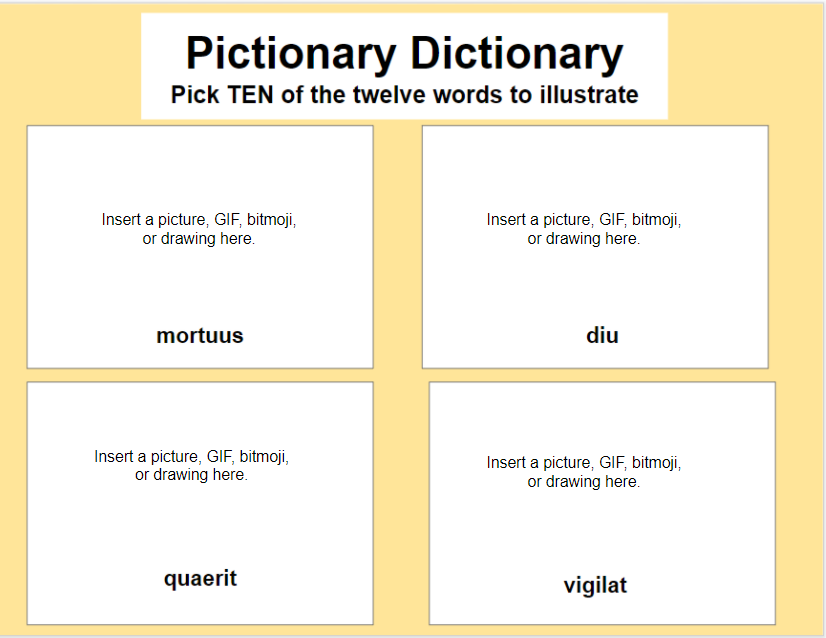
Digital Pictionary Dictionary
- Pick twelve vocabulary words which you wish to target or to review.
- Create a manipulative Google Slides template like below (see post here about creating manipulatives). I overlay the "Insert a picture, GIF, bitmoji, or drawing here" and not as part of the background template so that students can delete this. Below is an example of a template which I created based on words which students informed me that they "kind of knew/did not know" from last year
- Students are to find digital images of TEN of twelve vocabulary words, whether it be pictures, GIFs, bitmojis, memes, or drawings, and to insert them on the template.
- I assign this on Google Classroom so that each student has a copy of the template to manipulate. As a result of using Google Classroom, they can also turn it in electronically.
- Although there is some time spent on creating the template on my end, I love the creativity of students in their choice of digital images. While many are just doing a Google image search of vocabulary words and then just cutting/pasting the first image they find, many are actually taking their time to personalize their images. From an instructional technology standpoint, personalization is a very high-level demonstration of critical thinking and creativity! Below are some examples where students created themes of images as a demonstration of personalization:
Friday, May 3, 2019
Random Helpful CI Tips
- If you are trying to pre-teach a number of vocabulary words via storytelling, circling, pre-reading activities, etc., use a lot of proper nouns in English to aid in narrowing and focusing the target words for learners. This is especially helpful at the lower levels.
- Example: The girl is going to the store
- Better example: Cardi B is going to Burger King
B. and Burger King are proper nouns in English.
some students will take the definition literally and not make the connection which we
are intending. Therefore, do everything you can to establish meaning. This is why I
always establish meaning in English, even if I define the word in Latin. I need to ensure
that everyone in the room is on the same page with the definition.
Example: Years ago, I attempted to define the word tristis = non laetus. Now to me and
a number of students, the "obvious" meaning was sad, yet other students thought that
the word literally meant not happy, while others thought it could mean angry or scared.
Afterwards, I had students ask me, "So what word means sad in Latin, if tristis means
not happy?" A better way for me to have done this would have been to also put an
obvious picture, like a sad emoji, to give double input to establish meaning.
Example #2: Years ago in Latin 1, when I was doing a TPR lesson, I was
demonstrating the command porta (carry). I did not formally define the word, because I
thought that the meaning was obvious, so I was telling students "Porta (this) ad ianuam,
"Porta (that) ad me," etc. At the end, I asked students what they thought that porta
meant. While most students said carry, one student replied, "To walk with something
while holding it." If I had established meaning from the beginning, this student would
have been on board with the definition from the start.
Wednesday, March 20, 2019
The Card Game
- 5-6 different colored stacks of 3x5 index cards, with each stack being 20-25 cards. Depending on the number of students, you may need more or less.
- A list of 20-25 vocabulary words which students already know. Again, depending on the number of students, you may need more or less. You can also use short phrases if you want. I would not use sentences because they are too long.
- In each stack of colored index cards, write one vocabulary word VERY BIG in the target language per card. By the end, you will have 5-6 different colored stacks, with each stack having the same vocabulary words.
- As the teacher, take one of the colored stacks of cards.
- Divide the class into 4-5 different teams (depending on how many stacks of colored cards which you have left).
- Give a different stack of colored index cards to each team.
- Have each team distribute its cards to its team member. Each team member may not necessarily have the same amount of cards. Usually 5-6 words is a good amount of cards for each student.
- On the board, write the names of the colors of the cards in the target language on the board. Each color represents a team.
- Have students lay their cards out on their desks FACE UP so that they can read what is written on the cards. Each student should have between 4-6 cards.
- Now ask students if there are any words which they do not know and to ask you for the meaning. This is really important in order to establish meaning.
- Explain to the students, "I am going to call out the English definition of a word. If you have that word, then hold up the card as high as you can as quickly as you can. HOWEVER, there are 4-5 other teams who have that same word. The first correct card which I see gets a point. Also, just because I call a word once does not mean that I cannot call it again."
- As the teacher, pick a card from your stack, and call out the English definition.
- If students have that word, they are to hold up that card. Whatever team's correct card you see first will get a point.
- As the teacher, put the card back in your stack, and pull out another card. Repeat the directions - the first team which gets 10 points wins.
- At the end of the round (when a team gets 10 points), have teams switch cards within themselves, e.g., students with green cards will switch stacks between each other. Now students have a new set of vocabulary words. If students do not know the words, they are to ask the student who just had them.
- Play another round.
- After 2-3 rounds, tell students that they are to either:
- do a writing in the target language which involves the words which they have in their stack OR
- draw a picture which uses the words in their stack
- This became my students' favorite game (when I had desks). I played it as an adult when I learned it, and WOW, it is a very competitive game.
- This game is FAST, so this can frustrate the slower processors.
- What I like about this game is when students switch stacks and I call out a definition, students, who just had the card but switched with someone, can get very frustrated, because they no longer have that word. This shows me that those students know that word now.
- Although you can have students do a writing afterwards, I have found that drawing a picture was easier for students and did not require as much thought as preparing to write something.
- Because this can be a fast game and students will argue which card was held up first, I will also pick a student who will help me judge which team held up its card first.
Wednesday, February 20, 2019
Cartoon Olympics
Pre-Activity
- Create a list of new vocabulary words which you wish to pre-teach
- Create drawable sentences using these words - in many cases, the more random the sentence the better! I have found that 8 sentences are a good number. Be sure to get in repetitions!
- Create PowerPoint/Google slides of these sentences - 1 sentence per slide.
- Have the words above listed on the board, and call attention to them establishing the meaning of each.
- Students work in groups of 4.
- 4 students from the class are the identified judges. Each has a whiteboard, marker and eraser rag, and are seated together at one end of the room. Have those four chairs marked “iudex”.
- In each group, every student has a whiteboard, marker, and rag
- Number every student in a group as 1, 2, 3 or 4. If there are groups of three, one student will be both numbers 1 and 4. If there is a group of 5, two students will be number 4.
- Using the vocab above, project the first sentence on the screen - every student draws the best picture possible. Give students 1-2 minutes to establish meaning among the group and then around 2 minutes for each to draw a picture.
- After this, in their groups, students have 1 minute to help each other out with their pictures by suggesting addition to the pictures for clarification or suggesting changes
- Roll a die, and whatever number rolled is the student numbers who will submit their pictures to be judged. If I rolled a 5 or 6, then re-reroll die.
- At the front of the class on the board ledge or on chairs, groups will place their pictures for the class to see.
- Teacher clarifies the meaning of the sentence with the whole class.
- The four judges score on a scale of 1-5. Teacher gives paper to the judges to write down their score. Teacher keeps up with totals.
- Have the judges declare a "best in show" for the sentence, and show the picture to the class.
- Have students erase their whiteboards, and begin again.
- When all sentences have been done and scored, team with highest, next highest and third highest are declared the gold, silver and bronze medal winners of Cartoon Olympics. Have gold, silver and orange (or three different colors) stars to award to each member of the winning teams.
- If all sentences are not finished, this may extend to a second day.
- I was surprised at how engaged students were in this activity. The fact that students do not know if they will be selected to represent their team keeps students accountable to the activity.
- I have found that this is usually a 2-day activity, since around four sentences is how many can be done in a 50-minute period.
- The random roll of the die keeps the activity novel.
- I like how the groups collaborate among themselves to establish meaning of the sentence.
- The group consultation after students draw their picture is very important, because nobody in the group knows whose picture will be selected. This way, students will ensure that all aspects of the sentence are represented in each other's pictures.
- Students really do enjoy seeing each other's pictures as they are displayed at the front before the judging.
Thursday, November 30, 2017
Vocabulary Highlighter Game
Preparation
For this, you will need to create a word cloud of vocabulary words which you want to review. I have found that 25 words is a good amount. Unfortunately, finding a website/extension for the creation of word clouds has been difficult, because many websites like Wordle do not work on Chrome or are not compatible with Windows 10. I use a MS Word extension to create my word clouds. Google Docs also has an extension for word clouds, but I have found that MS Word has more capabilities.
Below is a video for creating a word cloud on MS Word.
- Font: Arial
- Colors: Black on White
- Layout: Half on Half (this will allow for words to be both horizontal and vertical)
- Case: Intelligent
- Pair up students.
- You can have students either sit next to each other or across from each other.
- Students will need a common surface between them. It can be a desk, or if your class is deskless like mine, then I had students sit on the floor with a whiteboard between them.
- Each student in a pair needs to have a different-colored highlighter, i.e., no two students who are paired up can have the same color highlighter.
- Give each student a handout of the word cloud.
- There will be two different rounds of play, so have each pair of students use only one of the word clouds for the first round.
- Have each pair place the word cloud between them, and give students roughly 30-45 seconds to look at the words in order to familiarize themselves with both the words and the layout.
- You as the teacher call out a definition in English.
- The goal for each student is to be the first person to highlight the correct word.
- After about 9-10 words, now tell students that they have to use their NON-DOMINANT hands to highlight the correct word. Do this for about 9-10 words.
- After most of the words have been called, have students count how many words they each got correct. They will know based on the color of their highlighter.
- To start the second round, students will now use the other word cloud.
- Tell students that they need to put this word cloud in a new orientation, i.e., if it was laid out horizontal before, now it needs to be vertical. This makes the second round more challenging, since although students know what words to expect, the words are in a "different place," since the orientation is different.
- Repeat steps 8-10 again.
- When finished, have students create their final totals for both rounds.
- As I said, this is a fast, quick activity. It lasts about 10 minutes.
- Depending on your students, it can get VERY competitive.
- I have a tub of different-colored highlighters in the event that students have the same color or do not have a highlighter. I suppose one can use markers for this activity.
- Having students use their non-dominant hand for part of it adds to the novelty of the activity.
- Variation: Because vocabulary does not exist in a language isolated outside of a context, you can make a word cloud out of phrases in the target language. I know that Wordle will allow you to do this.
- It is not really a CI activity, but it is definitely fun to watch!
Monday, February 20, 2017
4-Word Picture Stories
For this activity, I gave students seven words, of which they had to choose at least four to use (four of the seven words were completely new, and three were words which I wanted to recycle from the past, because I did not feel like many had truly acquired them). Like Bob, I then had them illustrate a 4-frame cartoon which incorporated those four words and to write a short 4-sentence minimum "story" in Latin which used those 4 words. Again, they could only use words which they knew and learned in class, i.e., no Google Translate! There had to be a minimum of one sentence per frame, but students could write more if they wanted.
I then took a number of their cartoons/stories and edited them for grammar errors. After this, I scanned their pictures and created a Google Slides presentation to show them over the next few days as warmups (3-4/day). The scanning and creating Google Slides presentations did take some time and effort to complete.
Examples
The seven words, from which students had to select at least four, were:
- castellum - castle/fort
- prandet - eats lunch
- custodit - is guarding
- fingit se - pretends that he/she
- catulus - puppy
- petit - heads for
- dux - leader
Observations
- Because these stories were written by students (and edited for grammar by me), the stories were completely comprehensible to them, because they were level-appropriate.
- Students really enjoyed seeing each other's stories. Many liked that their story had been picked to show!
- Many students enjoyed the freedom of choice in choosing which words to use, because it allowed them to be creative.
- Because students had to incorporate at least four of the seven words into their stories, this allowed for LOTS of repetitions of words, since every story had some degree of commonality of vocabulary.
- Even though students had to use four of the seven words in their stories, no student had the same exact story, so it allowed for LOTS of creativity.
- Because the stories were short (usually 4-6 sentences), it allowed for novelty and kept students engaged.
Wednesday, February 24, 2016
Word Frequency Counter Tool
NOTE - there are numerous word frequency counter websites online. This particular one is no different from any others, but it happens to be the one which I use.
What I love about this website is that it allows me to type (or cut/paste) a text and to find out the frequency of each word. When I am writing stories for my students, this is very important, because it helps me see if I am getting in enough repetitions of a target word/structure. If I feel like it is not enough, then I need to find ways to get in more repetitions.
The tool is quite easy to use
1) Go to http://rainbow.arch.scriptmania.com/tools/word_counter.html
2) Type in your text in the "text box"
3) After inputting the text, click on "count words"
4) You will then see a list of words and how many times each word appears in the story. It will break it down into total words in the story and then into unique words in the story. You can also choose to have the list arranged alphabetically. NOTE - a different form of the word counts as a unique word, so for Latin, that may be something to consider.
This tool has been of great use for me - I hope that you will find it helpful too!